
Housing Society ERP · File actions
Merge two files
Merge one file into another, so the money paid on the first is counted on the second. Any excess is shown for refund.
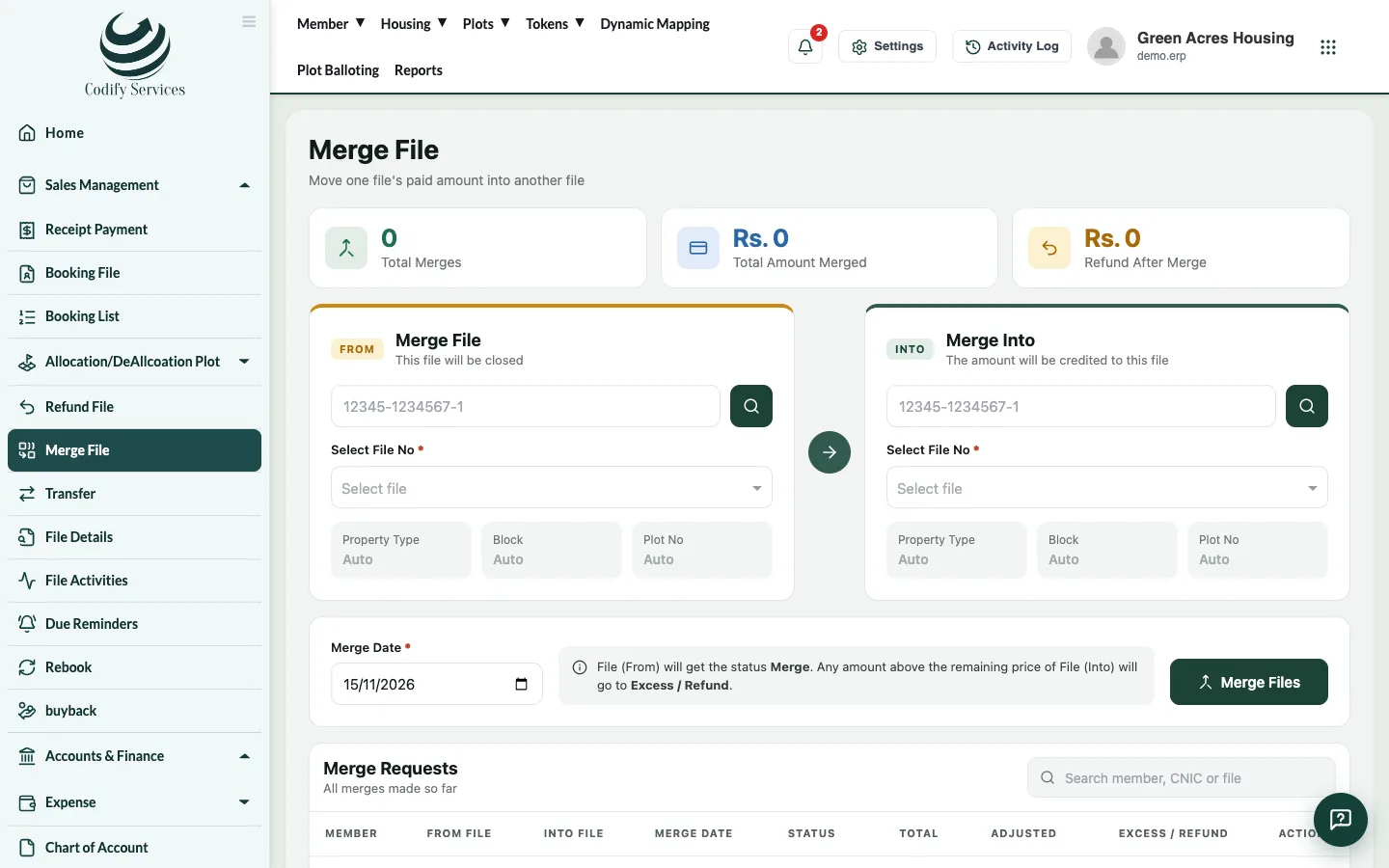
Merging moves the payments of one file into another file, for example when a member gives up a small plot for a bigger one.
Steps
- In the sidebar, open Sales Management > Merge File.
- Under Merge File, type the member's CNIC and choose the file to merge in Select File No.
- Under Merge Into, type the CNIC and choose the file that receives the payments.
- Enter the Merge Date.
- Press Merge Files.
Good to know
- Merge Requests lists every merge with the total, the amount adjusted and any Excess / Refund.
- The merged file leaves the active totals.
- Merging uses the same permission as refunds.
Related
More in File actions
Transfer a file to a new ownerMove a file from one member to another, collect the transfer fee and print the transfer letter.Refund or cancel a fileCancel a member's file and refund what they paid, less a refund fee, or simply make a file inactive.Rebook a fileGive a refunded or cancelled file to a new owner with a new installment plan.Buy back a fileRecord that the society bought a file back from its member, so it can be sold again.
Ready to try it? Open Housing Society ERP