
Land Management · Land deals
Add a land deal
Enter a land purchase: its place, khasras and areas, landowners and their shares, the price, the agreement, commission and buyers.
A land deal is one purchase of land. You enter where it is, which khasras (numbered fields in the revenue record) are bought and how much of each, who sells them, and the price.
Before you start
- Your role needs Can Add Land.
- The district, tehsil, union council and mauza must exist (Locations).
- Landowners can be picked from the Landowners register or added on the spot.
Steps
- Open Sidebar > Land Management > Add Land.
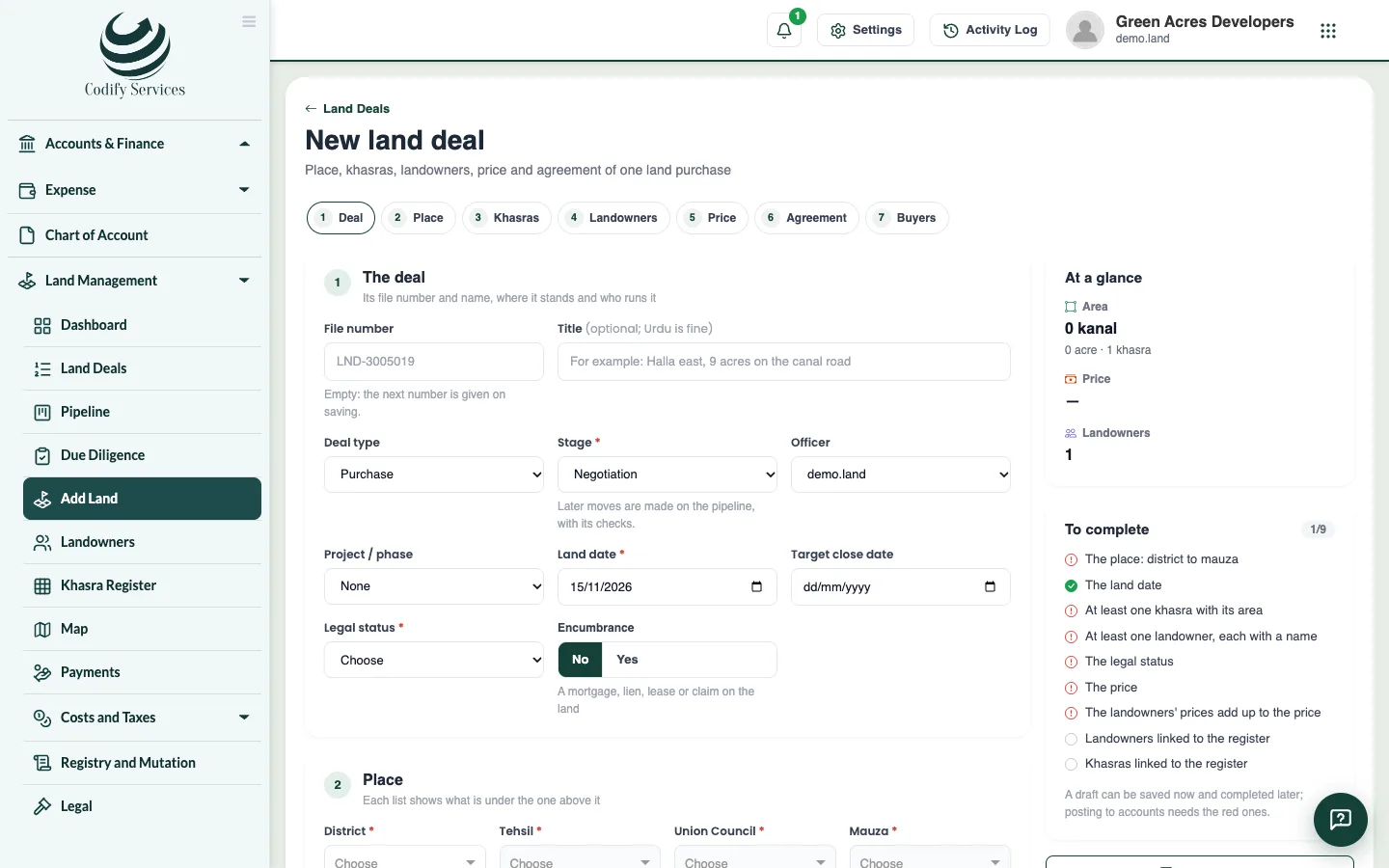
- Under Deal, leave the file number empty to get the next one (for example LND-0043). Enter a title, the deal type, the stage it starts at, the officer, the project or phase, the land date and target close date, the legal status and any encumbrance.
- Under Place, choose the district, tehsil, union council and mauza.
- Under Khasras, pick each khasra from the mauza's register (its area comes with it) or type it. Add the khewat, khatooni and murabba if you have them, the area bought in any unit (kanal, marla, acre, square feet), and the share when only part is bought (1/2, 3/40, 25%).
- Under Landowners, pick each seller, add a new one, or type one. Enter each one's share, area and price. Press Split the price by the shares to share the price out. Choose the attorney if one signs for a landowner.
- Under Price, enter a rate per acre, kanal or marla, or a lump sum, in your currency or another one at a rate.
- Fill in the Agreement, the Commission (an agency or agent) and the Buyers (the company, a director or a nominee).
- Press Save draft to keep an unfinished deal, or Save the deal when it is complete.
Good to know
- The card at the side shows the area, the price and what the deal still needs before it can be posted.
- The software warns when a khasra is on another deal. More than the whole of a khasra, or shares above 100%, are refused.
- The landowners' prices must add up to the deal's price.
- After an agreement, a price change asks why and may wait for another person's approval.
- A posted deal is read only until its posting is reversed.
Related
More in Land deals
Find land deals and use a deal's pageSearch and filter every land deal, export them to Excel, and open a deal's page with its summary and tabs.Move deals through the pipeline and log negotiationsSee every land deal by stage on a board, add new prospects, move deals forward with checks, and log each meeting, offer and counter-offer.Run due diligence on a land dealStart a deal's checklist of title and legal checks, mark each one clear or with an issue, record the lawyer's title opinion, and handle risk flags.Record agreements and the payment scheduleRecord a deal's agreement to sell or bayana receipt with its signatories, and set each landowner's schedule of token, installments and final payment.Post a land deal to accountsPost a complete land deal into Finance as vouchers, set up the land accounts it needs, and reverse a posting when needed.
Ready to try it? Open Land Management