
Billing & Invoicing · Import and files
Import customers, items and opening balances
Bring in your customers, items and what customers already owed when you started, from an Excel or CSV file, checked line by line.
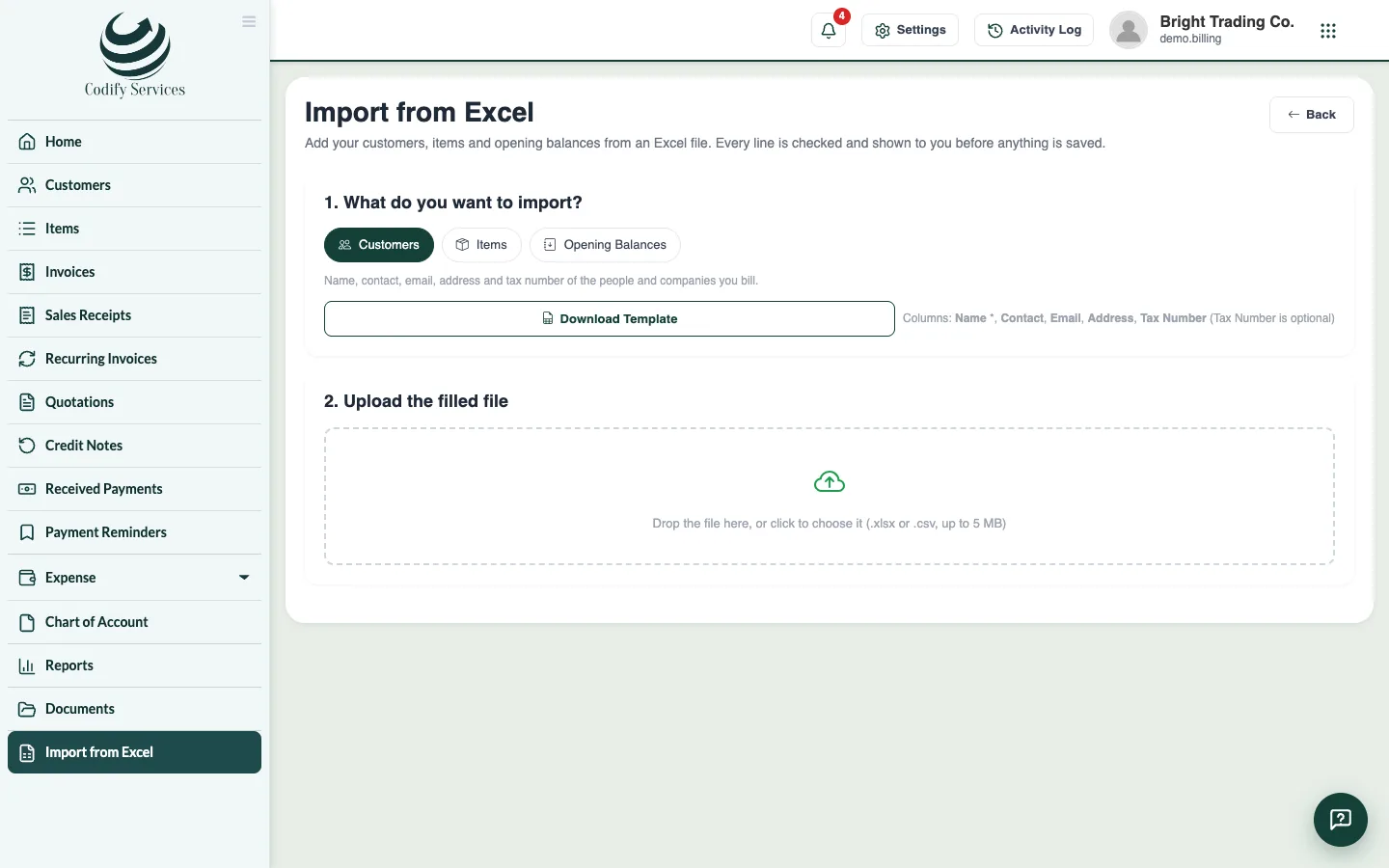
When you start with Billing, you can bring in your customers, items and opening balances from Excel. Every line is checked and shown to you before anything is saved.
Steps
- Open Sidebar > Import from Excel (at the bottom of the sidebar).
- Under 1. What do you want to import?, choose Customers, Items or Opening Balances.
- Press Download Template and fill it in. Keep the headings in the first line.
- Under 2. Upload the filled file, drop the file or click to choose it (.xlsx or .csv, up to 5 MB).
- Check the lines: each one is Ready or shows its errors. Tick Only lines with errors to see the problems.
- Press Import .... Lines with errors are left out.
- Under 3. Done, see what was added and what was skipped, and why.
Good to know
- Opening Balances is what each customer already owed when you started: one invoice per line, shown as money to collect. If a customer in the file is not in Billing yet, press Add missing customers.
- Columns marked * are required.
- You need the right to add customers, items or invoices.
Related
More in Import and files
Ready to try it? Open Billing & Invoicing