
Codify Store (POS) · Products and stock
Track batches and expiry dates
For medicines and food - record each batch with its expiry date, sell the first to expire, and write off expired stock.
For medicines and food, each purchase can say its batch number and expiry date. The counter sells the batch that expires first, and you see what is expired or expiring soon.
Steps
Switch it on
- Open Sidebar > Store Management > Products and edit the product.
- Tick Track batches & expiry and save.
- In Store Settings under Batches & expiry, choose Expired stock at the counter: Refuse it (recommended for medicines and food) or Allow it, with a warning, and how many days count as "Expiring soon".
Day to day
- When you enter a purchase, give each line its batch and expiry date.
- At the POS, the first batch to expire is picked. You can choose another batch on the line.
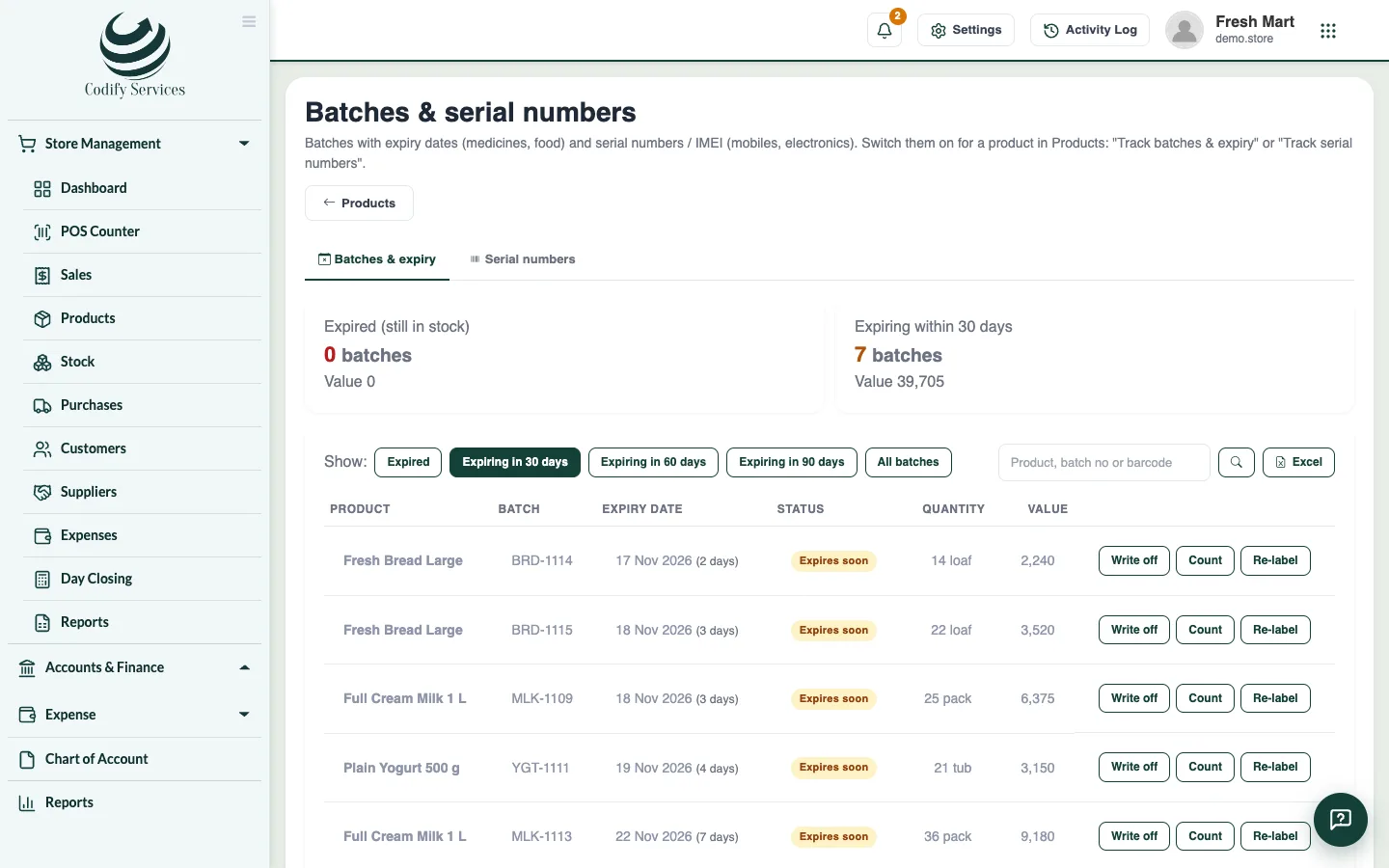
- Open Products > Batches & serials to see the Batches & expiry tab.
- Use Show: Expired, Expiring in ... days or All batches.
- Press Write off to take expired stock out, Count to correct a batch's quantity, or Re-label to move stock to a new batch number and expiry date.
Good to know
- The dashboard shows the batches expiring soon and the expired ones.
- A write-off is a stock adjustment with its reason, posted like any adjustment.
Related
More in Products and stock
Track serial numbers and IMEIFor mobiles and electronics - scan one serial number per unit when you buy and sell, find any serial's history and check the shelf.More shops and warehouses, and stock transfersAdd a second shop or warehouse, sell and count stock by location, and send stock from one location to another.Add products and categoriesAdd what you sell with its barcode, cost and sale price, tax, reorder level and opening stock, and group products in categories.Make barcodes and print labelsGive products without a barcode one of their own and print barcode labels with the price on an A4 sheet or a label printer.Sell a product in sizes and coloursMake one product with variants (size, colour, material), each with its own barcode, price and stock, and pick the variant at the counter.Import products and customers from ExcelAdd many products or customers at once from an Excel or CSV file. Every line is checked and shown before anything is saved.
Ready to try it? Open Codify Store (POS)