
Property Management · Selling units (builder)
Sell a unit with a booking and installment plan
For builders - book a unit for a buyer, set the price and discount, build the installment plan and add the dealer's commission.
A builder sells apartments, shops and offices with the sales pages. Each sale is a file: the buyer, the unit, the price and the installment plan.
Before you start
- The buyer must be registered: Top menu > Member > Member (CNIC, name, contact, address, photo).
- The unit must be added and not sold.
- Your package must include the builder side (Builder or Complete). See https://codifyservices.com/pricing/.
Steps
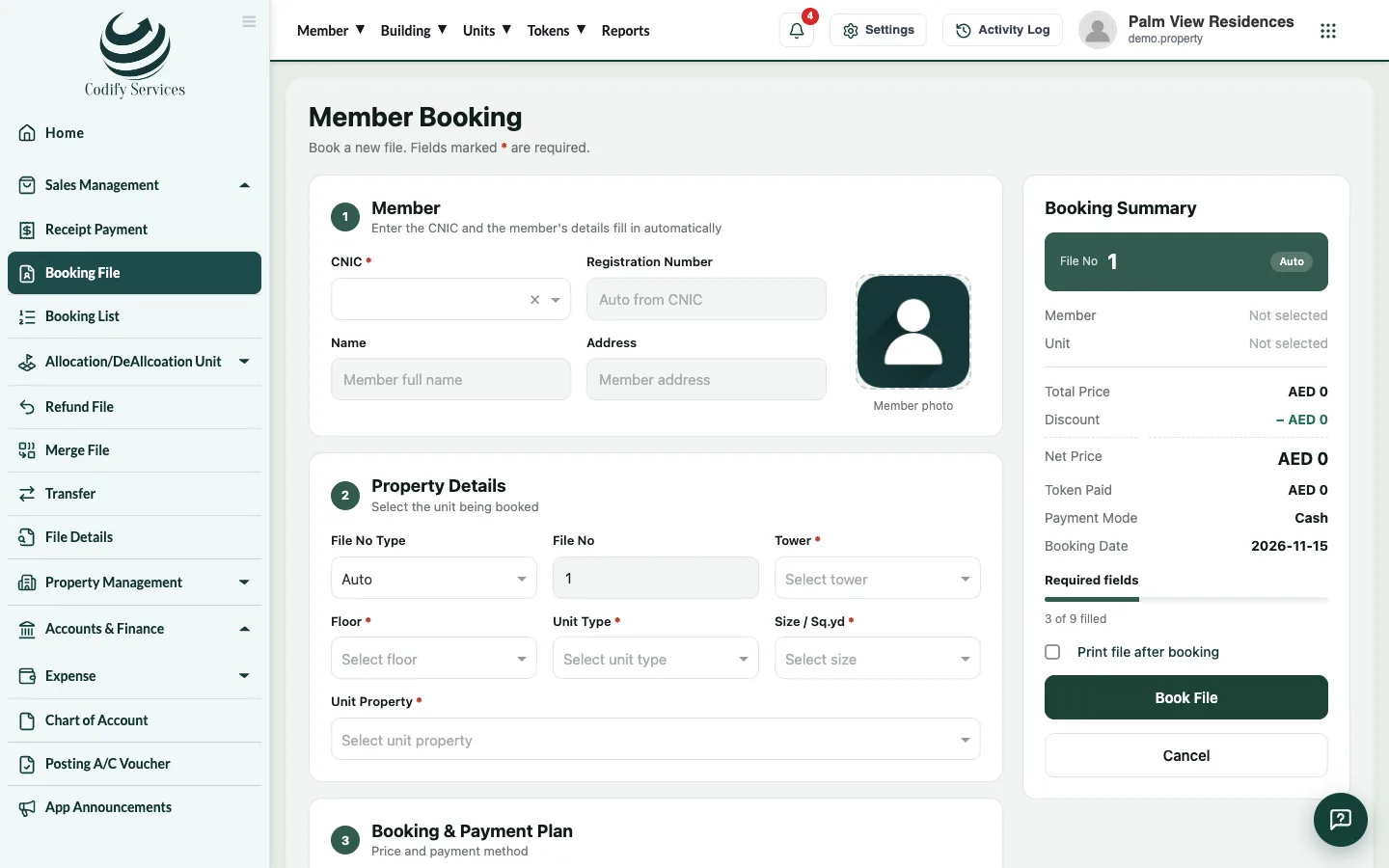
- Open Sidebar > Sales Management > Booking File.
- Under Member, type the buyer's CNIC, name or registration number and pick them.
- Choose the File No Type: automatic (the next number) or manual (type the File No).
- Under Property Details, choose the tower, floor, type and size of the unit.
- Under Booking & Payment Plan, choose the Payment Mode and Booking Date, then enter the Plan Name, Total Price and Discount Amount. The Net Price is worked out.
- Build the installment plan: the heads (booking, monthly installments, possession charges ...), their amounts, counts and dates.
- If a dealer sold it, fill in Dealer / Agent Commission: the Agent / Dealer or Agency, the Commission Type (fixed or %) and the Amount.
- Add a nominee if you like, tick Print file after booking, and book the file.
Good to know
- The plan heads (booking payment, monthly installment, possession charges ...) are set once under Configuration > Plan Head.
- All files are in Sidebar > Sales Management > Booking List: open, edit, add other charges, upload documents, send a notice or print.
- Once sold, the unit's owner can be brought into the residents with Owners from Sales on Units & Residents.
Related
More in Selling units (builder)
Receive a buyer's installmentFor builders - find the buyer's file, see the installment schedule, receive a payment, give a discount and print the receipt.Transfer a unit to a new ownerFor builders - transfer a sold unit's file from its owner to a new buyer, charge the transfer fee and print the transfer letter.Allot a unit and give possessionFor builders - allot a unit to a buyer's file, free it again if needed, and print the possession letter.Dealers and their commissionFor builders - add dealers and agencies with their commission rate, see what each has earned and pay their commission.
Ready to try it? Open Property Management